Error 403
Error 403 - Forbidden is related to the content of the access token. It happens when the token used does not have permissions compatible with those required to use the desired service.
Common causes
Missing scopes
When a call reaches our system, one of the validations performed concerns scopes. If your token does not have the scope required to consume the service, a 403 error is triggered.
For example: generating a token without the empresas.btgpactual.com/payments scope and trying to consume a Payments and Transfers service will result in a 403.
User without the required profiles
When a token is created, it is tied to the user who logged in during the authorization code flow. With this, we check which profiles the user has in the account where consent was given and define what the user can and cannot consume from the account.
When a token with fewer permissions than required is used to consume an API, the result will be a 403.
For example: a user with only the developer profile generated a token. This token is then used to consume a Payments and Transfers product in production. The result will be 403, because the user needs to have the accounts payable profile or the operator profile.
Token without a selected company
The 403 error can occur when the token used was generated from an authorization code flow where the company was not selected.
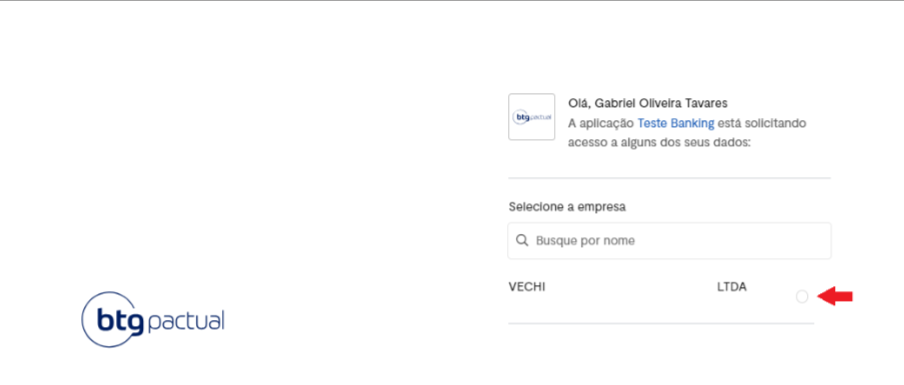
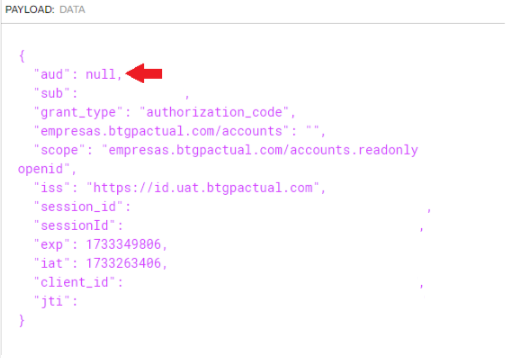
When decoding a token generated from such a flow, you can identify the problem by decoding the token and observing the "aud" claim, which will be "null".
Use of Postman web
When a request is fired from Postman web, it is immediately rejected and the 403 is triggered. You should use the desktop Postman/Insomnia or a script that fires the requests from your local server in preliminary test scenarios or when debugging individual requests.